Dream Room Guide: Read the Brief, Follow the Hearts and Get 3 Stars
Dream Room is a calm interior design game. Clients send you a short brief, and you pick the bed, walls, floor, art and more to match their style, colours and budget. Our first client, Mia, said "This is my DREAM room!" Here is exactly how the scoring works so you can do the same.
By Zaib · Updated 20 October 2026 · Free to play, no download
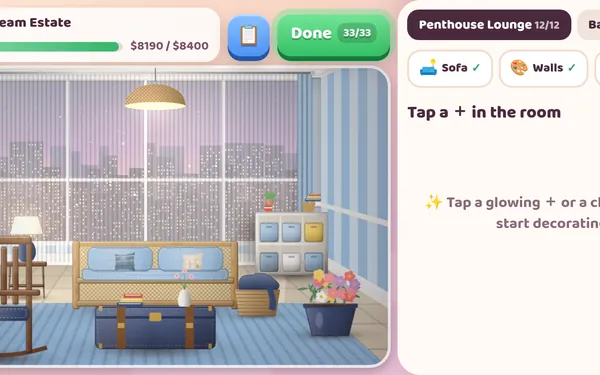
Dream Room has a soft, storybook look. Each level is a room drawn in gentle cartoon style, with glowing + signs where furniture can go. Tap one, browse the choices, pick a colour, and watch the room change. When every spot is filled, tap Done to see the before-and-after reveal and the client's reaction.
There are no timers, so it is a relaxing pick for children and adults who like making things look nice.
Our first room: Cosy First Flat
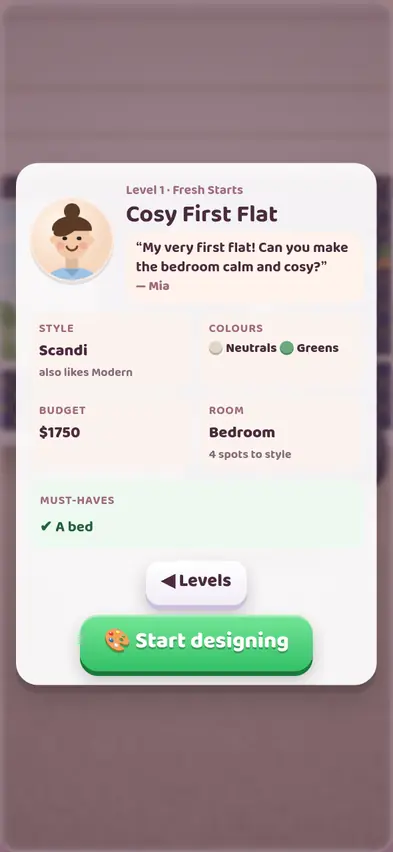
Level 1 is from Mia: *"My very first flat! Can you make the bedroom calm and cosy?"* The brief card shows everything you need:
- Style: Scandi (also likes Modern)
- Colours: Neutrals and Greens
- Budget: $1,750
- Room: a bedroom with 4 spots to style
- Must-haves: a bed
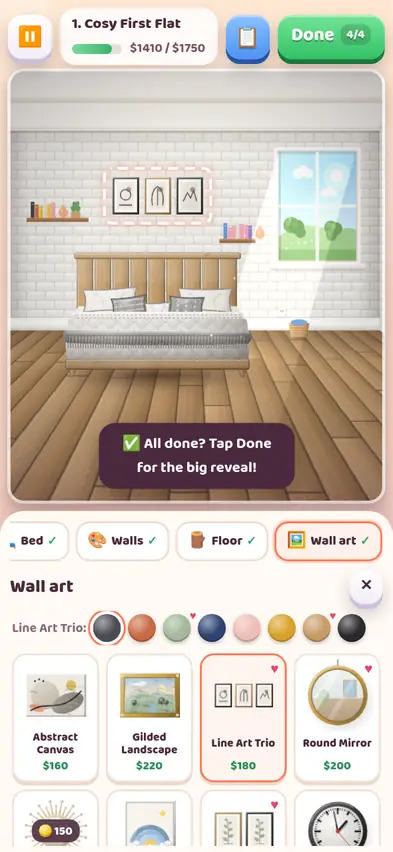
We pressed Start designing, and the top of the screen showed four category chips: Bed, Walls, Floor, Wall art. In each list, some pieces have a little ♥. That heart means *this client will like it*. We followed the hearts:
| Spot | Our pick | Price |
|---|---|---|
| Bed | Platform Bed ♥ | $700 |
| Walls | Subway Tile ♥ | $230 |
| Floor | Oak Planks ♥ | $300 |
| Wall art | Line Art Trio ♥ | $180 |
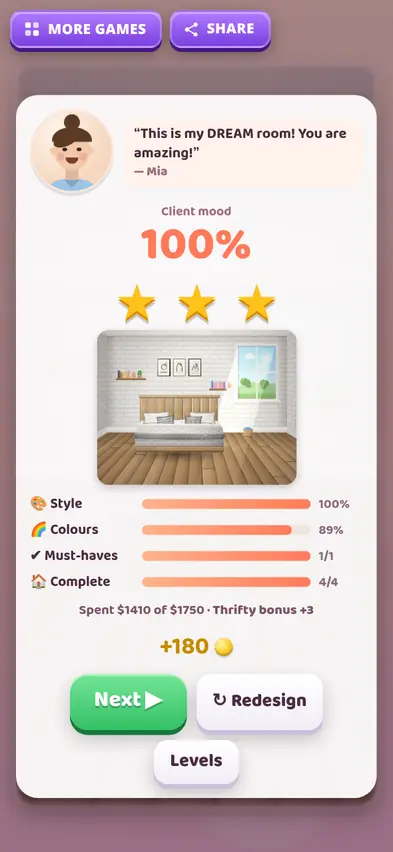
Total: $1,410 of $1,750. We tapped Done 4/4, and Mia said: *"This is my DREAM room! You are amazing!"* Client mood 100%, 3 stars, with Style 100%, Colours 89%, Must-haves 1/1, Complete 4/4, a Thrifty bonus +3, and +180 coins.
The lesson: read the brief, then look for the hearts. And you don't have to spend the whole budget. Spending less earned us a bonus.
How scoring works
Your client mood (0 to 100%) is made from four things:
| Part | Weight | What it measures |
|---|---|---|
| 🎨 Style | 32% | How well each piece matches the client's style |
| 🌈 Colours | 30% | How well colours match the client's palette |
| ✔ Must-haves | 22% | Whether you included everything on the list |
| 🏠 Complete | 16% | How many spots you filled |
Then:
- Thrifty bonus +3 if you fill every spot and spend no more than 85% of the budget.
- Stars: 90% mood or more is 3 stars, 78% is 2 stars, 60% is 1 star.
- Missing a must-have caps you at 1 star, however good the room looks. Always check the must-have list first.
In free-placement levels, items that overlap too much cost a few points, while a tidy layout earns a small bonus.
Budget rules
You can't finish a room over budget. If you try, the game says "Over budget! Swap a piece for a cheaper one." The budget counter at the top shows what you have spent. The quickest fix is usually the most expensive item: our Royal Canopy Bed option was $1,400 on its own.
Choosing colours
After picking a piece you choose its colour. This is where the Colours score comes from. Match the palette on the brief: for Mia that meant soft neutrals and greens, not bright red. Our 89% for colours shows there was still a little room to improve.
Chapters
There are 32 levels across five chapters. Each new chapter unlocks as you go:
| Chapter | Levels |
|---|---|
| Fresh Starts | 1 to 6 |
| Family Homes | 7 to 12 |
| Open for Business | 13 to 18 |
| Free Style | 19 to 25 |
| Dream Estates | 26 to 32 |
The early clients include Mia's bedroom, a Sunny Lounge, Leo's Playroom (a kids' room), a Spa Corner bathroom, a Blush Retreat bedroom and a Boho Hangout. Later levels are multi-room homes, so one brief covers several rooms at once. With 32 levels and 3 stars each, there are 96 stars to collect.
The Catalogue and My Designs
Some pieces are locked at first and open at higher levels (for example the Herringbone Parquet floor at level 2 or the Cabin Log Bed at level 10). The Catalogue shows everything, and My Designs keeps your finished rooms so you can look back at them.
Tips
- Check the must-haves first. Missing one caps you at 1 star.
- Pick hearts wherever you can.
- Match the colour palette after each piece.
- Leave 15% of the budget unspent for the Thrifty bonus.
- Fill every spot. Completeness counts.
FAQ
Is Dream Room good for kids?
Yes. There are no timers and no failing, just redesigning until the client is happy.
Can I redo a room?
Yes. Tap Redesign on the result card.
Is my progress saved?
Yes, on your device.