Betta Bestie Guide: Caring for Your Pet Fish Day by Day
Betta Bestie is a gentle virtual pet game where you look after a little betta fish in a cosy room. She never gets sick and never runs away, she just loves a bit of attention. This guide explains how to keep her happy and how to unlock every colour and decoration.
By Zaib · Updated 20 October 2026 · Free to play, no download
A pet that is always happy to see you
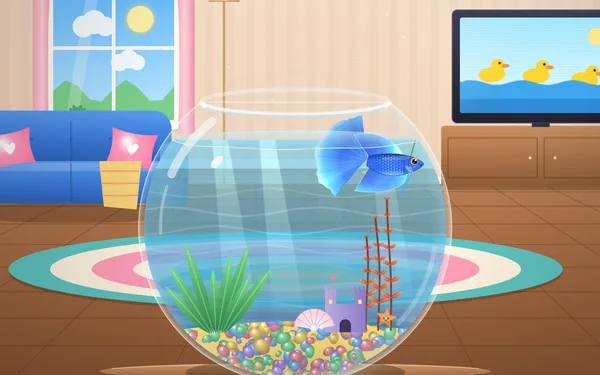
Betta Bestie puts a round fishbowl in a sunny little room with a sofa, a lamp and a TV. Inside the bowl lives your betta, a small fish with big flowing fins. You name her, pick her colour, and then pop in every day to feed her, keep her water sparkling and play little games together.
It was made with younger players in mind. There is no way to lose: if you forget her for a few days, she is simply a bit hungry and says "I missed you!" when you come back. Nothing bad happens. That makes it a calm game for a quiet five minutes, a car ride or the end of the day.
Your first visit
- Tap Play, type a name (or tap one of the suggestions such as Luna, Ruby or Bubbles) and pick a colour. Four colours are open from the start: Royal Blue, Ruby Red, Lilac Dream and Candy Pink.
- Tap She's ready! and the room appears.
- A Daily gift pops up. Tap Open gift! for your first coins.
- Tap Feed, then tap the water a few times to drop pellets. She swims over and gobbles them up.
The buttons along the bottom are everything you need: Feed, Clean, Play, TV and Shop. The trophy button at the top shows your achievements, and the gift button reopens the calendar.
The three care meters
Your betta has three meters: full (food), clean (water) and happy. They drift down slowly in real time, even while the game is closed, and her face changes to match. If any meter drops very low she looks a bit sad; when all three are high she is at her happiest.
| Meter | What raises it | What lowers it |
|---|---|---|
| Full | Pellets she eats | Time (slowly, a few points an hour) |
| Clean | Wiping algae off the glass, changing the water | Time, and pellets left uneaten on the bottom |
| Happy | Playing mini-games, tapping her, watching TV together | Time, and drops faster when she is hungry or the water is dirty |
The meters stop falling at a gentle floor, so even after a long holiday she is waiting for you, never in danger. In our long test we left the bowl for five days. When we came back she was hungry, the glass had eight algae spots, and she greeted us with "I missed you! I'm a bit hungry".
Feeding without overfeeding
The game reminds you: "Tap the water to drop pellets. Don't overfeed!" Each pellet sinks, and she chases it. If you drop more than she wants, the leftovers sit on the bottom and make the water dirty. After a day away, about eight pellets filled her right up in our test; on a normal daily visit, three or four is usually enough.
Feeding her once a day builds your feeding streak, shown with a little flame. Miss a day and the streak starts again from 1, but your best streak is remembered, and there are trophies for 3 days and 7 days in a row.
Keeping the bowl sparkling
Tap Clean and rub your finger over the green algae spots on the glass to wipe them away. There is also a water change that washes away leftover pellets and gives the clean meter a big boost. There are trophies for wiping 25 algae spots and for changing the water 5 times.
The mini-games
Tap Play to see the list. Each one lasts around half a minute and pays coins and experience.
- Follow the Sparkles: drag your finger and she follows it. Lead her through the sparkles.
- Bubble Pop: tap the rising bubbles before they reach the top. Gold bubbles are worth 5.
- Hoop Jump: tap to make her leap out of the water and through the hoop. Timing is everything.
- Mirror Flare: tap as each ring reaches the mirror so she flares her fins. Perfect taps count toward the Fin-tastic trophy.
- Trick Training: watch her do a short routine of tricks, then tap them back in the same order. It gets longer each round, like a memory game.
- TV Time: pick a cartoon channel and watch with her on the sofa. It is slow but restful, and it nudges her happy meter up.
Which game pays best? In our testing, Bubble Pop was the quickest way to level up: a round took about 30 seconds and gave 40 experience. Trick Training is the cleverest game but the slowest: ten perfect rounds took over two minutes for 20 experience. Play it because it is fun, not for the reward.
There is also a daily limit. After about 300 coins from mini-games in one day, she gets sleepy and mini-game coins are halved until tomorrow. The game tells you with a little "getting sleepy" note, so you know it is time for a break.
The daily gift calendar
Opening the game each day gives a gift: 20, 30, 40, 50, 60 and 80 coins for days 1 to 6, then a super gift of 150 coins on day 7. After day 7 the calendar starts over at day 1. If you skip a day, the calendar simply pauses and waits; you do not lose your place.
Colours and levels
Everything you do gives experience, and new levels unlock new colours and shop items. These are the betta colours and the level each one needs:
| Colour | Level |
|---|---|
| Royal Blue, Ruby Red, Lilac Dream, Candy Pink | 1 |
| Golden Sun | 3 |
| Turquoise | 5 |
| Marble Koi | 7 |
| Black Orchid | 9 |
| Galaxy | 12 |
| Rainbow | 15 |
You can change her colour at any time from the shop's Colours tab once it is unlocked. Rainbow is the last colour to unlock. Our ten-day test, with plenty of play every day, reached level 18, so with shorter daily visits expect it to take a few weeks.
The shop
The shop has six tabs: Decor, Plants, Gravel, TV (cartoon channels), Cushions (for the sofa) and Colours. Prices run from 40 coins for a Pearl Shell to 260 for the Sunken Ship. Some items also need a certain level, shown with a little lock.
Good first buys: the Pearl Shell (40) and Moss Ball (50) are cheap and open from level 1. The Duck Pond channel (60) gives TV Time something new to show. Save the big pieces like the Sunken Ship and Candy Coral for later levels. Tap an item you own to place it in the bowl or take it out again, so you can redecorate whenever you like.
Little tips
- Visit once a day rather than for a long time. A quick feed, a wipe and one mini-game keeps every meter healthy and grows your streak.
- Tap her! Petting her makes her happy, and 50 taps earns the Best Buddies trophy.
- Do the Daily gift before anything else so you never miss a day of the calendar.
- If coins start to feel slow, that is the daily limit. Watch some TV with her or come back tomorrow.
- There are 19 trophies in total. The ones that take longest are Week of Love (feed 7 days in a row) and Clever Fish (reach round 6 in Trick Training).
What we changed after testing
We played Betta Bestie over ten in-game days before writing this, and the game was updated several times after its first release:
- The daily coin limit used to halve rewards silently, which was confusing. Now a friendly "getting sleepy" message explains it.
- The Hoop Jump hint used to sit over the bowl when playing sideways on a phone. It now sits beside the bowl and fades after your first jump.
- The "I missed you" greeting now waits until after the gift calendar closes, so the two don't pile on top of each other.
- The flame streak at the top now shows the right number as soon as you open the game.
- Earlier updates added more movement to the room (bubble streams, light ripples on the gravel) and made the name screen fit on short, wide screens.
Questions parents ask
Can my betta die or get sick?
No. The meters slow down and stop at a floor, so she can get hungry or a bit sad but never sick. Coming back and feeding her fixes everything.
Does it cost anything?
No. Betta Bestie is free to play. Coins are earned in the game only, and there is nothing to buy with real money.
Does it save if we close the browser?
Yes. Her name, colour, coins, items and trophies are saved on your device automatically. Playing on a different phone or browser starts a new bowl.
How long should a play session be?
It works best in short visits of five to ten minutes. The daily coin limit gently encourages a break after a good amount of play.
Does it work on a computer?
Yes. Everything is tap or click based, so it plays the same with a mouse. It is designed first for phones and tablets.